
Supported now in Cyata for discovery and active posture management. Yes, it took us less than three hours to ship it to production.
Antigravity in a sentence
Today Google launched Gemini 3 and with it Google Antigravity – an “agent first” coding tool that lets multiple AI agents work across an editor, terminal and browser inside a dedicated IDE.
Think Cursor or Windsurf, but with Gemini 3 Pro as the default brain, support for other models like Claude Sonnet 4.5, and a mission control style view for managing agents and their tasks.
From a Cyata perspective, this is good news:
- It confirms that agentic IDEs are becoming mainstream, not experimental.
- It gives developers another powerful option in the Cursor class of tools.
- It gives security and identity teams one more place where agents are acting inside real systems.
Which is exactly why we made sure Antigravity agents are already visible in Cyata the same day it shipped.
What Antigravity actually is (and is not)
Antigravity is:
- An agent centric IDE where agents can read and write code, run shell commands and drive a browser from a single UI.
- Built around Gemini 3 Pro, with options to swap in other models.
- Available now in for macOS, Windows and Linux, with generous free usage for Gemini 3 Pro during the preview.
Inside the IDE you get two main views:
- Editor view – looks like a normal IDE with an editor and file tree, plus side panel agents that can generate, refactor and run code, as well as drive the terminal and browser.
- Manager view – a higher level “mission control” that shows multiple agents, their tasks, and which workspace they are operating in.
As agents work, Antigravity generates Artifacts – plans, task lists, code change summaries, terminal logs, screenshots and browser recordings that document what the agents did.
So this is not “Gemini inside VS Code” as a simple extension, and it is not a revolution in how software is written. It is Google’s entry into the agent IDE segment, side by side with Cursor, Windsurf, Copilot based environments and others.
That is exactly the world we designed Cyata for.
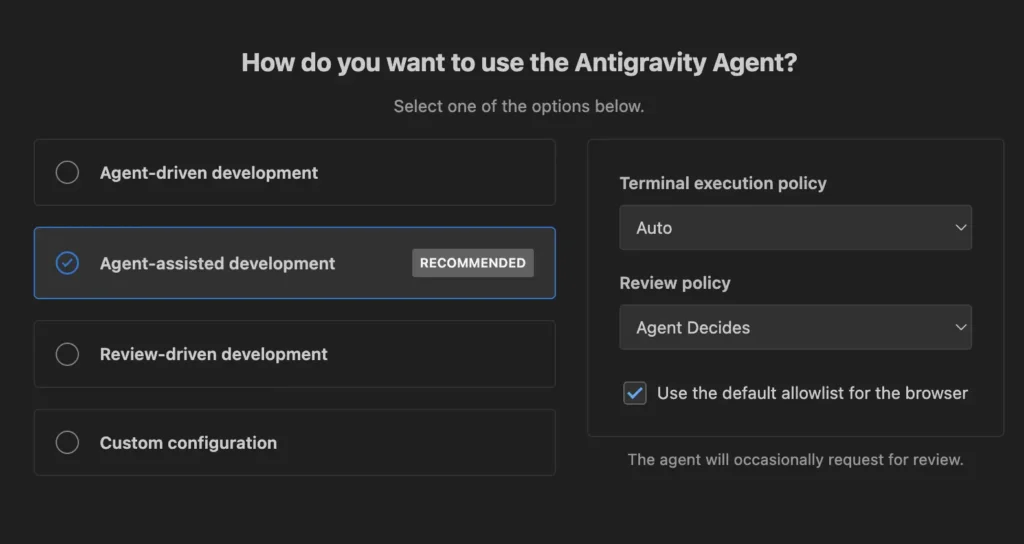
Agent Modes – the autonomy dial
One of the most interesting features for us is Agent Modes.
In Antigravity’s settings Google separates:
- Model settings – which model to run (Gemini 3, Claude, OSS, etc.), context, cost and latency tradeoffs.
- Agent Modes – how quickly and how independently agents are allowed to act. Think of it as a set of presets for “how much initiative” the agents can take on your behalf.
From the docs and quick experimentation, the modes roughly span this spectrum:
- A conservative mode where the agent mostly proposes plans, diffs and commands, and waits for you to approve.
- A balanced mode where the agent can auto apply low risk changes and prompt you only for higher impact ones.
- A high autonomy mode where the agent can plan and execute multi step tasks across editor, terminal and browser with fewer interruptions, with Artifacts acting as receipts for what happened.
If you are already using Cursor, Windsurf or similar tools, this pattern will feel familiar. Antigravity bakes it into first party UX and gives it a clear label, which is a good design choice.
A short security analysis: what Agent Modes solve and what they do not
Our recent post “Why AISPM Isnt Enough: Introducing Agentic SPM” argued that agents are a new security primitive and that tools focused only on model safety miss the real risk surface.
Antigravity is a concrete example of that shift:
- Agents are the unit of work.
- They can operate your editor, shell and browser.
- They are positioned as long running collaborators, not one off completions.
So how do Agent Modes help?
They reduce blind autonomy in the IDE
Requiring explicit confirmation for higher impact edits and commands is a real mitigation for “excessive autonomy” type failures. Good UX here will save people from some bad days.
They do not decide which tools exist or what those tools can touch
Antigravity does not manage your cloud roles, vault policies or internal API scopes. If a workspace is wired to production, the agent is wired to production. That is normal for an IDE, but it matters: Agent Modes tune autonomy inside whatever sandbox you have (or have not) created.
They are local to this product
A mode choice in Antigravity does not automatically apply to:
- GitHub Copilot in a different IDE
- Gemini CLI on the same laptop
- your home-grown MCP based agent surfaces
- SaaS tools that embed Gemini 3 Pro agents in their own UI
So Agent Modes are a useful local control, not a full answer to agent governance. That is where Agentic SPM comes in.
What “Antigravity support in Cyata” means in practice
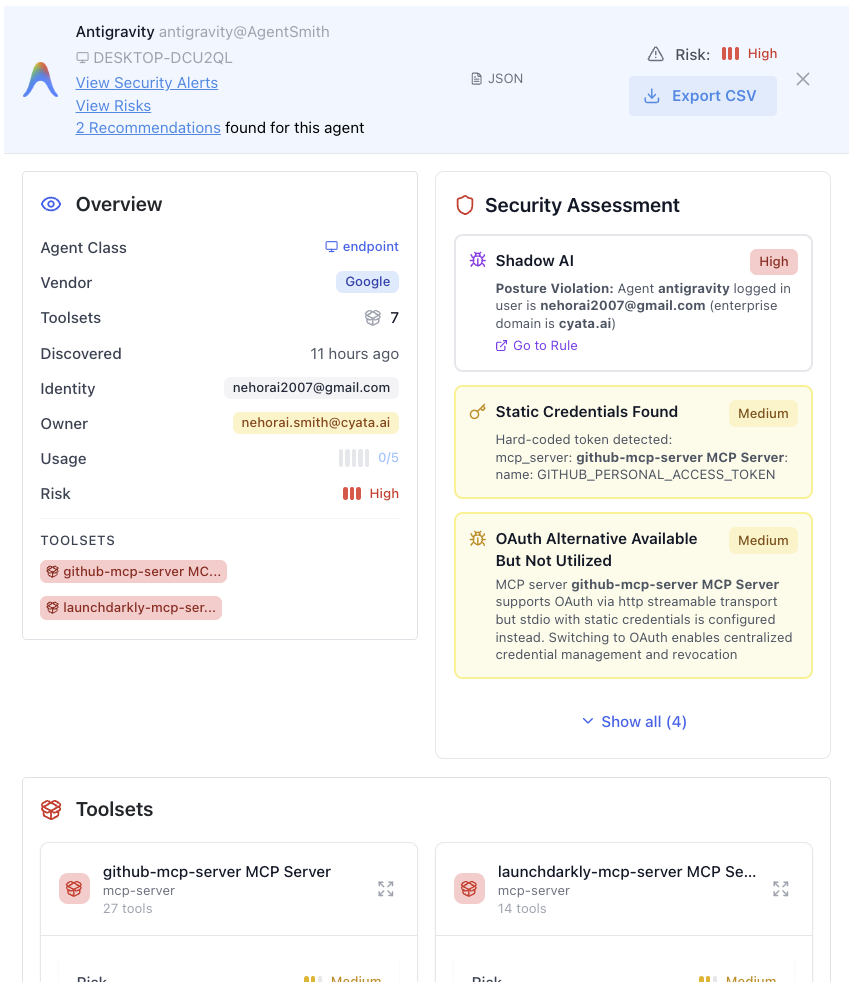
When we say Antigravity is already fully supported in Cyata for discovery and active posture management, we mean:
1. Discovery of Antigravity agents
Cyata can now:
- Detect Antigravity agent deployments, alongside agents in Cursor, Claude Code, Warp and other surfaces.
- Attribute those agents to:
- a specific developer
- a specific workstation
- the underlying model configuration (for example Gemini 3 vs Sonnet 4.5)
That closes the gap between “new IDE just landed” and “security, IAM and platform teams know which agents exist where.”
2. Posture management across Agent Modes
We treat Antigravity’s Agent Modes as one input into an agent’s posture, not the whole story:
- We map which mode is in use for each agent.
- We augment that with:
- what tools the agent can call
- which identities and secrets those tools use
- which systems those identities can reach
So you can, for example, query:
“Show me all Antigravity agents currently running in high autonomy mode that have write access to our Atlassian environment.”
And not be surprised by the answer.
Antigravity gives your developers an autonomy dial in the IDE. Cyata lets your organization decide how far that dial is allowed to turn.
Why we shipped support in a few hours
The fun part of yesterday evening is that we did not just read the Antigravity announcement. We turned it into running code.
Because Cyata is built as a control plane for agentic identity, integrating a new agent surface mostly means:
- teaching our discovery layer how to recognize its agents
- mapping its local concepts (like Agent Modes and workspaces) into our agent identity schema
- updating a few policies and dashboards so Antigravity shows up like any other source
That is work we can safely automate. So we did. With agents.
It is a nice example of our own thesis in action:
Agentic tools will keep arriving. The important thing is not which IDE wins, but whether you have a consistent way to see, understand and control the agents they host.
How to think about Antigravity if you run security or identity
Our recommendation to customers is simple:
- Let your developers kick the tires on Antigravity like they would on Cursor, Windsurf or Copilot based tooling. It is a strong new option, especially if you are already investing in Google AI infrastructure.
- Standardize some common sense guardrails around Agent Modes:
- conservative modes for anything touching infra, IAM and production
- higher autonomy only in sandboxes and clearly scoped tasks
- Use Agentic SPM as the independent control plane:
- discover agents across all these tools
- map their posture beyond a single IDE
- enforce runtime policies in a way that survives the next shiny launch
Antigravity is not the end of manual coding and it is not the last agent IDE you will meet. It is one more step toward a world where “agents are acting” is the normal state of your environment.
Cyata exists so that when that world arrives, security is watching.
If you want to see what Antigravity looks like inside Cyata’s console, we are already running live demos.
The Control Plane for Agentic Identity